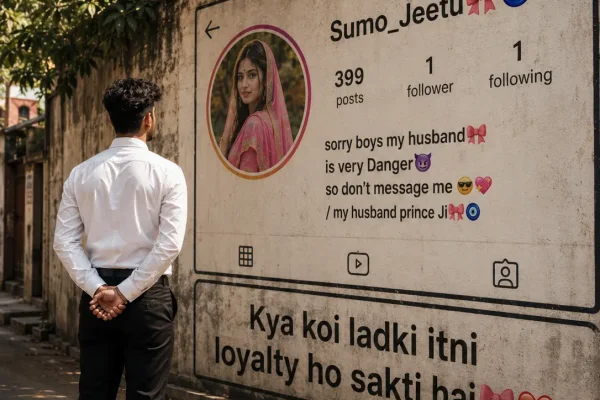
One of the more creative AI photo trends making the rounds right now takes something ordinary — your Instagram profile screen — and blows it up into a massive, cinematic wall display in a realistic street scene, with you standing nearby like it's an actual outdoor advertisement. It's a striking, editorial-looking image that works well as a profile picture, a milestone post, or just a fun personal branding visual.
This guide covers how the effect works, a ready-to-use prompt, and how to get the most realistic result out of it.
What This Prompt Actually Creates
Instead of a typical portrait, this prompt generates a full street photography scene: a large, poster-sized version of your Instagram profile (complete with your photo, username, and follower count) mounted on a wall or billboard-style surface, photographed as though it's part of a real urban environment. You, or the subject of the photo, typically appear in the frame too — walking past, standing near it, or looking at it — which is what sells the illusion that it's a real, physical installation rather than a digital edit.
The realism comes from treating it like an actual photography assignment: natural street lighting, believable wall textures, and a candid, unposed human presence in the scene.
Ready-to-Use Prompt
Copy this and paste it into ChatGPT along with a clear screenshot of your Instagram profile and a separate reference photo of yourself:
"Using the uploaded Instagram profile screenshot as the exact reference, create an ultra-realistic street photography scene where this profile is displayed as a large printed poster mounted on an aged concrete wall in an urban outdoor setting. Preserve all profile details exactly as shown — profile photo, username, follower count, and bio text. The poster should have realistic paper texture, slight weathering, and natural shadows cast across it from surrounding elements. In the foreground, include a person (based on the second uploaded reference photo) walking past or standing near the wall, viewed candidly rather than posed, dressed casually. Use soft natural daylight, a shallow depth of field with the wall poster in slightly sharper focus, muted urban color grading, and a documentary-style photographic look. Avoid any illustration, cartoon, or overly polished digital-art appearance — the final image should look like an actual DSLR street photo."
How to Use This Prompt Step by Step
- Take a clean screenshot of your Instagram profile page, making sure your photo, username, and follower count are clearly visible.
- Choose a separate, clear reference photo of yourself for the "person in the scene."
- Open ChatGPT and upload both images.
- Paste the prompt above, adjusting details like wall type, weather, or outfit if you want a different mood.
- Generate the image, and regenerate 2-3 times if the poster text or your likeness doesn't come out clearly — this is normal for text-heavy prompts.
- Compare versions and pick the one where both the profile details and your facial likeness look most accurate.
Getting a More Realistic Result
- Add "keep all text sharp and legible, do not distort characters" if the username or follower count comes out blurry or garbled — this happens fairly often with AI-generated text.
- Include "preserve exact facial features from the reference photo" to stop the person in the scene from drifting away from your actual likeness.
- Specify a location type (narrow alley, busy street corner, quiet side street) for more control over the background mood.
- If the poster looks too clean or digital, add "visible wear, slight tears, realistic paper texture" to sell the illusion further.
Common Mistakes to Avoid
- Using a low-resolution profile screenshot. Blurry source text almost always leads to garbled, unreadable text in the final image.
- Skipping the second reference photo. Without a clear photo of yourself, the person in the scene often ends up looking like a generic AI figure rather than you.
- Overloading the prompt with too many scene elements. Keeping the background relatively simple helps the AI render the poster and person accurately instead of getting distracted by extra detail.
- Expecting perfect text on the first try. Regenerating a couple of times is often necessary to get the username and numbers rendered cleanly.
Frequently Asked Questions
Q1. Does this work on tools other than ChatGPT?
Yes, the same prompt structure generally works on Gemini and other AI image tools, though results may vary slightly between them.
Q2. Why does the text on the poster look distorted?
AI image generators sometimes struggle with rendering small text accurately. Using a clear, high-resolution screenshot and regenerating a few times usually improves this.
Q3. Can I use this for a Facebook or other social profile instead of Instagram?
Yes, simply upload a screenshot of that profile instead, and adjust the wording in the prompt accordingly.
Q4. Is a paid AI tool required for this?
No, this works with the free tier of ChatGPT, though results may take a few more attempts to get right.
Q5. How many tries does it usually take to get a clean result?
Most people need 3 to 5 generations to get both the poster text and their own likeness looking accurate and natural.
Conclusion
This Instagram wall profile prompt works because it treats a digital profile like a real, physical object photographed in an actual street setting — the more realistic the lighting, texture, and candid human presence feel, the more convincing the final image looks. With a clear profile screenshot, a good reference photo, and a couple of regenerations, you can get a genuinely striking, shareable result.