Car Stunt Flying AI Video Prompt 2026
"This guide gives you seven ready-to-copy car stunt and flying car video prompts, each built for a different kind of reel – desert ramp jump, monsoon bridge jump, cliff-to-wings transformation, neon city flight and more."
Car Stunt Flying AI Video Prompt 2026: You have seen these clips at least ten times this week. A car tears down a dusty track, hits a ramp, and for two full seconds it just hangs in the air – wheels still spinning, dust trailing behind, the sun flaring right through the windscreen – before it slams down and keeps going. The comments are always the same: "Bhai ye real hai kya?" It is not. Nobody risked their neck. Somebody typed a good prompt.
This guide gives you seven ready-to-copy car stunt and flying car video prompts, each built for a different kind of reel – desert ramp jump, monsoon bridge jump, cliff-to-wings transformation, neon city flight and more. You will also learn why some prompts give a smooth cinematic jump while others give a melted car with five wheels, which AI video tools handle physics best, and the small fixes that turn a weird clip into one people actually share.
Why Car Stunt Flying AI Videos Are Blowing Up Right Now
Car content has always done well in India. Modified Thar reels, Scorpio entry videos, highway drone shots – people stop scrolling for cars. What changed in 2026 is that AI video models finally understand weight. A year ago, an AI car would float like a balloon and land like a paper cup. Now the suspension compresses, the body tilts forward in the air the way a real car does, and the dust kicks up in the right direction.
That realism is the hook. The clip looks like a big-budget action scene, but it cost you zero rupees and five minutes. And because these are short, loud, 8–10 second moments, they fit perfectly into Reels and Shorts, where the first two seconds decide everything.
One more reason they work: you do not need to show your face. For creators who are camera-shy, or pages that post theme content instead of personal content, a car stunt reel is easy, repeatable and still gets reach.
What You Need Before You Start
- An AI video tool: Google Veo 3 (inside the Gemini app or Flow), Kling AI, Hailuo (MiniMax), Runway or any text-to-video app you already use
- Clip length: most tools give 5–10 seconds per generation, which is perfect for one stunt
- Format: ask for 9:16 vertical if the reel is for Instagram or Shorts
- Optional: a clear photo of your own car if you want to try the image-to-video prompt at the end
- Price: every tool listed has some free daily or monthly credits; limits change often, so check inside the app
How a Good Car Stunt Video Prompt Is Built
Before the prompts, two minutes on why they are written the way they are. Once you understand this, you can make your own versions for any car and any location.
Name the car clearly, but not by brand. "A matte black 4x4 SUV with a roof light bar" works better than a brand name. Some tools block brand names, and others try too hard to copy a logo and mess up the grille.
Describe the stunt in three beats. Approach, airtime, landing. AI video models follow order well. If you only write "car jumps", you get a random hop. If you write what happens before, during and after, you get a scene.
Give the camera a job. "Low-angle tracking shot", "FPV drone chasing behind", "static wide shot from the side" – the camera movement decides whether it feels like a movie or like CCTV footage.
Talk about physics out loud. Words like "realistic weight", "suspension compresses on landing", "body tilts nose-down in the air" stop the floaty, cartoon look.
Ask for slow motion only where you want it. "Slow motion during the airtime, normal speed on approach and landing" gives you that speed-ramp effect people love.
Add sound if your tool supports it. Veo 3 and a few others generate audio. Mentioning engine roar, tyre screech and a heavy thud on landing makes a big difference.
Car Stunt Flying AI Video Prompts (Copy and Paste)
1. Desert Ramp Jump in Slow Motion
The classic. This is the one most viral clips are based on, and it is the easiest for AI tools to get right because the background is simple.
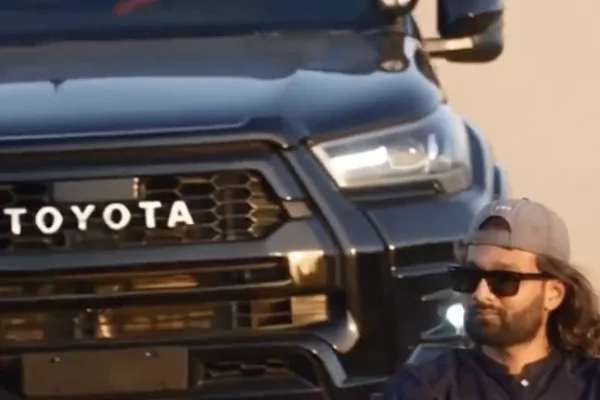
2. Toyota Car Stunt AI Video Prompt – Direct Video Animation Prompt (For Google Flow)
Tip: if your number plate is visible in the photo, blur it before uploading. It keeps your details private and the reel still looks the same.
Which AI Tool Is Best for Car Stunt Videos?
Google Veo 3 gives the most "movie" feel and also generates sound, so the engine roar and landing thud come built in. It follows long, detailed prompts well. Best for prompts 1, 2 and 3.
Kling AI is very good with fast motion and camera movement, and its image-to-video holds a car's shape well. Try prompt 7 here first.
Hailuo (MiniMax) handles dramatic action and slow motion nicely and is quick to generate. Good for the stadium barrel roll.
Runway gives you more control over the camera if you like to tweak things, but you may need a few tries for realistic landings.
No tool is perfect every time. Generate two or three versions of the same prompt and keep the best one – that is what most creators with smooth-looking clips are actually doing.
Turn One Clip Into a Full Reel
A single 8-second stunt is good. Three connected clips is a reel people watch twice. Here is a simple way to do it:
- The build-up: generate a short clip of just the car revving or racing toward camera. No jump yet.
- The stunt: use one of the prompts above for the jump or flight.
- The landing hero shot: a slow, low-angle shot of the car rolling to a stop with dust settling.
- The edit: join them in VN or CapCut, cut the jump exactly on a bass drop, and add a quick white flash at the moment of take-off.
Keep the same car colour and description in all three prompts so the car looks like the same vehicle throughout.
Common Mistakes That Ruin Car Stunt AI Videos
Writing too little. "Car flying stunt cinematic" gives the AI nothing to work with. You get random results and then blame the tool.
Asking for too many stunts in one clip. A jump, a flip, a drift and a crash in 8 seconds will melt the car. One clip, one stunt.
Using real brand logos and model names. The AI tries to recreate the badge, gets it wrong, and the front of the car looks strange. Describe the car instead.
Forgetting the camera. Without a camera instruction the AI often picks a shaky or flat angle, and the whole clip loses its punch.
Choosing horizontal by mistake. Many tools default to 16:9. Cropping later cuts off the car mid-jump. Ask for 9:16 in the prompt and in the settings.
Car Stunt AI Video Not Coming Out Right? Quick Fixes
The car changes shape or grows extra wheels: add "the car keeps the same shape, size and number of wheels throughout" and shorten the clip duration.
The car floats like a balloon: add "realistic heavy weight, gravity pulls the car down, nose tilts forward in the air".
The landing looks soft or fake: add "suspension compresses hard, car bounces once, dust and debris burst out on impact".
The road or ramp disappears mid-clip: describe the ramp and the landing area clearly, and use a simpler background like desert or an empty highway.
The prompt gets blocked: remove words like "crash", "explosion" or anything about people getting hurt. Keep it a clean stunt, not an accident.
Image-to-video changes your car: use a sharper photo with the full car visible, and repeat "keep the exact same car from the uploaded photo" at the start and end of the prompt.
A Quick Word on Safety
Every clip here is AI-generated. Please do not try any of these stunts on a real road, even a small ramp on an empty street. Real cars do not land like they do in these videos, and a small jump can break the suspension, the axle, or worse. Also, when you upload, turn on the "AI info" or "Made with AI" label on Instagram and YouTube. It is honest, it keeps your account safe, and people still love the clip – most of the fun is knowing it was made with a prompt.
Captions for Your Car Stunt AI Reel
- Gaadi ne socha aaj udna hai, toh ud gayi.
- Speed breaker dekha, ramp samajh liya.
- Petrol nahi, sapne bhar ke chalate hain.
- Traffic se bachne ka naya tareeka.
- When the road ends but the vibe doesn't.
- Made with AI, felt like Hollywood.
- Gravity called. I didn't pick up.
- Not real. Still replayed it five times, didn't you?
Frequently Asked Questions
What is a car stunt flying AI video prompt?
It is a text description you paste into an AI video generator to create a short clip of a car doing a jump, flip or flight. The better the prompt describes the car, the stunt, the camera and the physics, the more realistic the result.
Which app is free for making car stunt AI videos?
Kling AI, Hailuo, Runway and the Gemini app (Veo) all offer some free credits. The exact limits keep changing, so check the app before you start. Free credits are usually enough for two or three test clips a day.
Can I make these videos on my phone?
Yes. Gemini, Kling and Hailuo all work on Android and iPhone through their apps or the mobile browser. Copy the prompt from this page and paste it straight in.
Can I use a photo of my own car?
Yes, use prompt 7 with the image-to-video option. A clear daylight photo with the full car in frame gives the best result. Blur the number plate before uploading.
Why does my AI car look melted or change shape?
Usually the prompt asks for too much in one clip, or the car description is vague. Keep one stunt per clip, describe the car in detail, and add a line saying the car keeps the same shape throughout.
How do I edit the AI clip into a reel?
Download the clip and open it in VN or CapCut. Add music, cut the take-off on the beat, and add a short flash transition. You can join two or three AI clips to make a full story.
Do these prompts work in CapCut's AI video feature?
Mostly yes. CapCut's AI video tool accepts shorter prompts, so remove the SOUND line and trim the description if it gets cut off.
Will Instagram remove AI car stunt videos?
No, AI-generated content is allowed as long as it does not show real harm or mislead people. Turn on the AI label when posting, and avoid crash or accident scenes.
Conclusion
A good car stunt flying AI video is not about luck. It is about telling the AI three things clearly: what the car looks like, what happens in the jump from start to finish, and where the camera is. Start with the desert ramp prompt – it is the most forgiving and the fastest way to get a clip you will actually want to post. Once that works, try the monsoon bridge or the cliff-to-wings version, and then make one with your own car. Generate a couple of versions, pick the best, cut it on the beat, and let the comments ask "bhai ye real hai kya?"
Copyright Notice
VNqrCode only shares AI prompts and editing guides. We do not host or provide downloads of any song or video. All music and brand names belong to their respective owners. To request removal, see our DMCA page or email contact@vnqrcode.in.
Hashtags: #CarStuntAI #FlyingCarAI #AIVideoPrompt #AIVideo2026 #CarReels #Veo3 #KlingAI #AIReels #CarLovers #VNqrCode