High Resolution • 4K Quality • Optimized for VN App
Compatible with all VN Versions
Join WhatsApp Group
Daily viral VN drops
Khatu Shyam VN Template
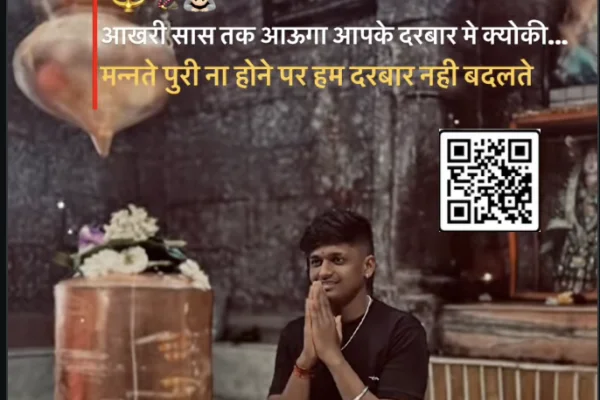
Searching for a Khatu Shyam VN template free download? You are at the right place. This trending VN template turns your Baba Shyam darshan photos into a divine, professionally edited bhakti reel in under a minute – complete with soft glow effects, bhajan-synced transitions and that devotional feel that makes people stop scrolling. Whether you want an Ekadashi status video, a Falgun Mela yatra reel or a simple Friday devotional post, this one free template covers every occasion – no editing skills, no paid apps, just a QR code scan in the free VN Video Editor.
"Haare ka sahara, Khatu Shyam hamara" – if these words live in your heart, this template belongs on your profile.
Khatu Shyam VN Template – Overview
DetailInformationTemplate NameKhatu Shyam VN Template (Bhakti Special)CategoryDevotional / Bhakti Reel TemplateApp RequiredVN Video Editor (Free, no watermark)Photos Needed8–12 (exact count shown inside template)StyleDivine glow, soft transitions, bhajan beat syncBest ForDarshan photos, Khatu Dham yatra, Ekadashi status, Friday postsFormatVertical 9:16 (Instagram Reels, WhatsApp Status, Shorts)Price100% Free via QR Code
When to Use This Template (Occasions That Bring Views)
The beauty of a devotional template is that its occasions never stop coming – keep it saved and your reel is ready all year:
- Ekadashi – Baba Shyam's Ekadashi arrives every month, and devotee profiles light up with Shyam status videos that day
- Falgun Mela – Khatu Dham's biggest festival, when lakhs of devotees walk with nishan flags; yatra photos look most beautiful in this template
- Friday and Sunday status – thousands of devotees post a weekly Baba status
- After your Khatu Dham yatra – turn darshan photos into a memory reel worth keeping
- Gratitude reels – for those "jo saunpa Baba ko, wo poora hua" moments
4 Tips That Make a Bhakti Reel Truly Divine
- Open with Baba's shringar or mukh darshan photo – the first frame defines a devotional reel and becomes its cover.
- Arrange photos like a yatra story – darshan → journey → nishan → darbar. When viewers relive their own yatra through your sequence, that is when a reel touches hearts (and gets shared).
- Keep text minimal – one line like "Haare ka sahara" is enough; heavy text buries the devotion.
- Drop blurry crowd shots – choose clear darshan photos over shaky temple-crowd ones. Photo quality decides reel quality.
Template Not Working? Quick Fixes
- QR won't scan → increase screen brightness and retry, or use the download-and-"Scan from Album" method
- "Template not found" error → update your VN app to the latest version
- Photos getting cropped → use vertical photos only; the template is built for 9:16 reel format
- Quality dropped after export → export at 1080p and upload directly – never send through WhatsApp first, it compresses the video
Frequently Asked Questions (FAQ)
Is the Khatu Shyam VN template really free to download?
Yes, completely free – scan the QR code above and the template opens directly inside the VN app. No payment, no sign-up.
How do I add a bhajan to the reel?
Export the video from VN first, then add any original Khatu Shyam bhajan audio from Instagram's music library while posting – it syncs with the template's timing.
How many photos does this template need?
Between 8 and 12 depending on the version – the exact count appears the moment you tap Use Template.
Can I use this same template for Ekadashi status videos?
Absolutely – Ekadashi, Falgun Mela, Friday status or post-yatra reels – one template covers every occasion; just change the photos.
Does this template work in CapCut?
No – VN templates only work inside VN Video Editor. CapCut has its own separate template system.
Conclusion
How to Use the Khatu Shyam VN Template Template:
- 1. How to Use the Template in VN App (vn template Method)
- 2. Install VN Video Editor from the Play Store or App Store – completely free, no watermark.
- 3. Scan the QR code above with another phone's camera. Same phone? Download the QR image and open it via VN's "Scan from Album" option.
- 4. Tap "Use Template" when it opens.
- 5. Select your darshan and yatra photos from the gallery – they appear in the order you select them.
- 6. Check the preview → Export at 1080p.
- 7. While posting on Instagram, add an original Khatu Shyam bhajan audio from the music library – the template is beat-matched, so the tune locks in automatically.
For the cleanest result, replace each template clip with high-resolution vertical (9:16) footage, and keep the original beat markers so your transitions stay perfectly in sync with the music.
More Bhakti Assets
View AllVN Template Code Mahakal 2026
View Asset