High Resolution • 4K Quality • Optimized for VN App
Compatible with all VN Versions
Join WhatsApp Group
Daily viral VN drops
Prem Ma Padvu VN Template Code 2026
Prem Ma Padvu VN Template Code 2026: "Prem ma padvu" is one of those Gujarati phrases that says everything in three words – the nervous, happy, slightly scary feeling of falling in love. If you have a few good photos with someone special, or even a few of yourself on a happy day, this VN template turns them into a short, smooth love reel without a long editing session.
This guide covers what the template does, why Gujarati love reels connect so well with the audience, which photos to pick, how to arrange them into a small story, some original ideas so your reel does not look like everyone else's, mistakes to avoid, quick fixes if the QR does not open, and captions in Gujarati-Hinglish and English.
Why a Gujarati Love Reel Connects Better
A reel in your own language feels personal. The words, the mood and the small cultural touches – a garba night, a chai at a roadside lari, a rainy evening in Ahmedabad, a Sunday at Kankaria – make people feel "this is about us." That is why regional love reels often get more comments and shares from friends than generic Hindi-English ones.
A ready-made VN template makes this easy. The cuts, zooms and colour tone are already matched to the track, so you only need to bring your photos and a bit of feeling. No keyframes, no trial and error with transitions.
What the Prem Ma Padvu VN Template Does
The template gives a soft, romantic reel. It opens slowly, builds with the rhythm, and ends on a long final frame meant for your best photo.
- Photos needed: 6 photos (you can mix in short video clips)
- Reel length: around 20–25 seconds
- Format: 9:16 vertical, made for Reels, Shorts and Status
- Style: beat-synced cuts, gentle zoom transitions, warm romantic tone
- Works on: Android and iPhone (VN app)
- Price: free to use
Who Can Use This Prem Ma Padvu VN Template
- Couples making an anniversary, proposal or "first meet" reel
- Newly engaged or newly married partners sharing a memory
- Friends who want a fun, romantic-mood reel for their own photos
- Long-distance partners putting together old photos and screenshots of video calls
- Gujarati pages and creators posting regional love content
- Anyone making a Valentine's Day, birthday or wedding-season reel
Which Photos to Choose for the Prem Ma Padvu VN Template
Start with a quiet frame. A side profile, two cups of chai, or a hand-in-hand shot. The opening should feel gentle, not posed.
Use real moments. Laughing together, a street food stop, a navratri evening, a bike ride. Genuine photos look better than perfectly posed ones.
Include one wide shot. A photo showing the place – a lake, a garden, a festival lane – adds depth and makes the reel feel like a memory, not a slideshow.
Add one close-up. A smile or a candid look. Close-ups carry emotion and work well at the peak of the music.
Finish with your strongest photo. The last frame stays on screen the longest, so use your sharpest and best-lit picture.
Check light before pose. A bright photo with soft light beats a dark one with a perfect pose. Golden hour and window light work best.
How to Arrange Photos So the Reel Tells a Story
- Part 1 – The beginning (photos 1–2): shy, quiet photos from when you first met or first went out.
- Part 2 – Getting closer (photos 3–4): trips, food dates, festivals, inside jokes.
- Part 3 – The feeling (photo 5): your most emotional or happiest shot, placed where the music rises.
- Part 4 – The promise (photo 6): a final frame that feels like "aaj bhi wahi, kal bhi wahi."
Fresh Ideas to Make Your Reel Different
Tell the story of one day. Instead of random photos, use morning chai, afternoon walk, evening sunset and night drive from the same day. It plays like a mini film.
Use a "first and latest" pair. Put your oldest photo together and your newest one at the end. People love the before-and-after feeling.
Add a short line of text on the last frame. One simple line in Gujarati or English is enough.
Make it a surprise. Send the finished reel to your partner on a normal day, not a special one. The surprise makes it feel real.
Respect privacy. Only post photos that both of you are comfortable sharing publicly.
Common Mistakes to Avoid
- Using blurry or dark photos. They look worse on a large screen than in the gallery.
- Posting private photos without consent. Always ask your partner first.
- Cropping faces. Check the preview before you export.
- Too many effects. The template is already complete. Extra stickers distract.
- Same pose in every photo. Mix wide shots, close-ups and candid frames.
- Low export quality. Choose 1080p so it stays sharp after upload.
Prem Ma Padvu VN Code Not Working? Quick Fixes
QR does not scan: raise screen brightness, hold steady and scan from 15–20 cm away. On the same phone, take a screenshot and use the gallery option in the VN scanner.
Template does not load: update the VN app, check your internet and scan again.
Photos look cropped: tap the photo in the timeline and adjust its position, or choose a photo with the subject near the centre.
No sound after export: check that the audio track is not muted in the timeline.
Export stuck: free some storage, close other apps and export again.
iPhone problem: allow VN to access Photos and Camera in iPhone settings, then scan again.
Captions for Your Prem Ma Padvu Reel
Gujarati / Hinglish:
- Prem ma padvu toh padvu, pachhi koi chinta nathi.
- Tari saathe chai pan mithi lage chhe.
- Dil ne kya khabar, kyare tari pase aavi gayu.
- Saath tu hoy toh badhu saru lage.
- Aa safar tari saathe j sundar chhe.
English:
- Fell in love, and never looked back.
- Everything feels easier with you.
- My favourite chapter is still us.
- Small moments, big feelings.
- Still choosing you.
Frequently Asked Questions
How do I use the Prem Ma Padvu VN template code?
Install the VN app, tap "+", choose Scan QR Code, scan the code on this page, replace the placeholders with your photos and export in 1080p.
Is this VN template free?
Yes, the template and the VN app are free to use.
Does it work on iPhone?
Yes. It works on Android and iPhone with the latest VN app.
How many photos does it need?
It uses 6 photos. You can use short video clips in place of some.
Can I use this in CapCut?
No. VN templates open only in the VN app. In CapCut you can copy the same photo order and edit manually.
Can I change the song?
Yes, you can mute or replace the audio inside VN. Music belongs to its owners, so use audio you are allowed to use.
Can I use it for a friendship or solo reel?
Yes. The photos do not have to be of a couple. A happy solo or friends reel works well with the soft mood.
Why is the QR code not scanning?
Low brightness, an old VN version or a slow connection are the usual reasons. Try the fixes listed above.
Conclusion
The best love reels are not the most edited ones, they are the most honest ones. Pick six real moments, arrange them from shy to certain, and let the template handle the timing. Scan the QR, swap your photos, export in 1080p and send it to the person it is about. Prem ma padvu hoy toh aavu j hoy.
Copyright Notice
VNqrCode only shares VN template QR codes and editing guides. We do not host or provide downloads of any song or video. All music belongs to its respective owners. To request removal, see our DMCA page or email contact@vnqrcode.in.
Hashtags: #PremMaPadvu #GujaratiLoveReel #VNTemplate #VNCode2026 #GujaratiStatus #CoupleReel #VNQrCode
How to Use the Prem Ma Padvu VN Template Code 2026 Template:
- 1. Install the VN app from the Play Store or App Store (it's free).
- 2. Open the VN app and tap the "+" button.
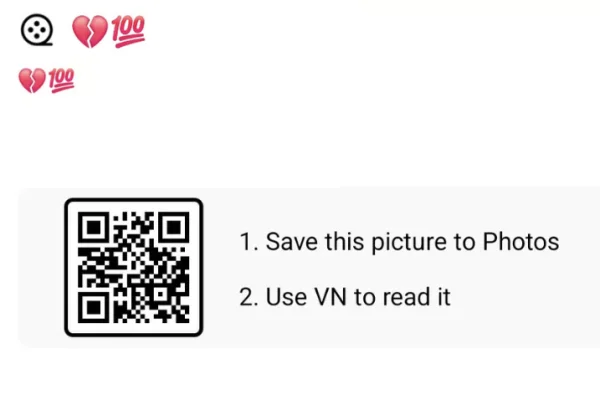
- 3. Choose "Scan QR Code". This is the camera scanner inside VN.
- 4. Scan the Prem Ma Padvu VN QR Code shown on this page.
- 5. If you're viewing this page on the same phone that has VN, take a screenshot of the QR and pick it from the gallery option in the scanner.
- 6. Wait for the template to load completely. If your internet is slow, give it a moment.
- 7. Tap each placeholder and replace it with your own photos or video clips (the template needs 6).
- 8. Play the preview. If a face is cut off, adjust the photo's position in the timeline.
- 9. Tap Export and set the quality to 1080p.
- 10. Upload to Instagram Reels, YouTube Shorts or WhatsApp Status.
For the cleanest result, replace each template clip with high-resolution vertical (9:16) footage, and keep the original beat markers so your transitions stay perfectly in sync with the music.
More Couple Assets
View AllBest Couple VN Template Code 2026
View Asset