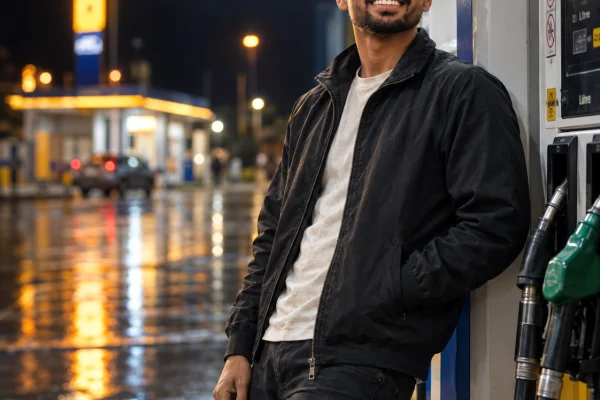
Petrol Pump AI Photo Prompt for Boys (2026) | Poses That Don't Look Stiff
Copy Paste Prompt Below
1. Leaning Against the Dispenser
The default for a reason. Easy, casual, hard to get wrong.
Edit the uploaded photo into a night portrait at a petrol station.
IDENTITY: Use the uploaded image as the only face reference. Keep the
exact face, skin tone, hairstyle and natural texture with visible pores.
No smoothing, no slimming, no beautification.
POSE: Leaning back against a fuel dispenser, weight on one leg, one
hand in his jacket pocket and the other resting loosely at his side.
Shoulders angled away from the camera, head turned to look down the
road to his left.
LIGHT: Overhead canopy lighting from directly above, strong top-down
light on the head and shoulders, shadow under the brow, darkness beyond
the canopy.
SET: A fuel station at night, generic unbranded signage, wet reflective
tarmac.
CAMERA: 50mm, f/2.0, eye level, background blurred.
FINISH: Cool white light against warm signage glow, realistic
reflections, natural skin detail, fine grain. No HDR, no plastic skin.
4:5 vertical, high resolution.
2. Seated Sideways on the Bike
The most-shared variant in this trend, and the one with the highest engagement.
Edit the uploaded photo into a night petrol station portrait with a
motorcycle.
IDENTITY: Preserve the exact face, hairstyle, skin tone and texture from
the uploaded reference. No beautification, no reshaping.
POSE: Seated sideways on a parked motorcycle, both feet on the ground,
forearms resting on his thighs, leaning slightly forward. Helmet resting
on the tank beside him. Looking down and away from the camera, relaxed
rather than posed.
LIGHT: Canopy lighting directly overhead, hard top-down light, deep
shadow beyond the canopy edge.
SET: A fuel station at night, generic unbranded pumps, a dark sports
motorcycle, wet tarmac reflecting the lights and the bike's paint.
CAMERA: 35mm, f/2.2, slightly low angle so the bike and canopy are both
in frame.
FINISH: Cool overhead light, warm reflections on the bodywork, realistic
wet ground, fine grain. 4:5 vertical, high resolution.
3. Mid-Walk, Away From the Camera
The candid one. Movement instantly removes the posed feeling, and this works even when your source photo is ordinary.
Edit the uploaded photo into a candid night photograph at a petrol
station.
IDENTITY: Keep the exact face, hairstyle, skin tone and natural texture
from the uploaded image. No smoothing, no slimming.
POSE: Walking away from the dispenser toward the camera's left,
mid-step, jacket moving with the motion, one hand adjusting his sleeve.
Not looking at the camera at all.
LIGHT: Overhead canopy lighting, strong from above, everything past the
canopy in darkness.
SET: A fuel station at night, generic signage, wet tarmac with light
reflections stretching across it.
CAMERA: 35mm, f/2.0, eye level, slight motion blur on the hands and
jacket while the face stays sharp.
FINISH: Cool white and warm signage mix, realistic reflections, visible
grain, no oversharpening. 4:5 vertical, high resolution.
4. Crouched Beside the Bike
Low angle, strong silhouette. The most cinematic of the five.
Edit the uploaded photo into a cinematic night portrait at a petrol
station.
IDENTITY: Preserve the exact face, hairstyle, skin tone and natural
texture from the uploaded reference. No beautification.
POSE: Crouched on one knee beside a parked motorcycle, one forearm
resting on his raised knee, the other hand touching the ground for
balance. Head turned up and away from the camera.
LIGHT: Canopy light from directly overhead creating a strong pool of
light around him, with heavy shadow falling away in every direction.
SET: A fuel station at night, generic unbranded pumps, wet tarmac,
motorcycle beside him.
CAMERA: 35mm, f/2.0, low angle close to ground level looking slightly
up.
FINISH: High contrast, deep but detailed shadows, realistic ground
reflections, fine grain. No HDR look. 4:5 vertical, high resolution.
5. Back to Camera, Facing the Road
The one that stands out on a feed where every other photo is front-facing.
Edit the uploaded photo into a night photograph at a petrol station,
shot from behind.
IDENTITY: Use the uploaded image as the face reference. The subject is
seen from behind and slightly to the side, with part of his profile
visible. Keep the hairstyle, build and skin tone accurate to the
reference.
POSE: Standing at the edge of the forecourt with his back to the
camera, hands in his pockets, looking out at the dark road ahead.
Shoulders relaxed.
LIGHT: Canopy lighting behind him casting his shadow forward across the
tarmac, the road ahead almost completely dark.
SET: A fuel station at night, generic signage glowing behind, empty
highway stretching into darkness ahead.
CAMERA: 50mm, f/2.2, eye level, shot from a few steps behind him.
FINISH: Strong contrast between the lit forecourt and the dark road,
realistic long shadow, visible grain. 4:5 vertical, high resolution.
Here's what happens to most boys who try this trend. The prompt is fine, the lighting comes out great, the petrol pump looks real — and the guy standing in the middle of it looks like he's waiting for a bus. Arms hanging straight down, shoulders square to the camera, absolutely no idea what his hands are doing.
That's the whole problem with petrol pump AI photo prompts for boys, and it isn't a prompt-quality issue. It's that nobody tells the AI what the body should be doing, so it defaults to a passport-photo stance with a fuel dispenser behind it.
The fix is to build the prompt around a pose instead of a location. Below are five that consistently work, each with a ready prompt — and none of them need a background image.
Why the Stiff Pose Happens
AI models put the body in a neutral position unless you tell them otherwise, because that's the safest thing to generate. Neutral reads as awkward in a cinematic setting.
Three things fix it in every prompt:
Give the hands a job. In a pocket, holding a helmet, resting on a bike's tank, adjusting a sleeve. Hands with nothing to do are what make a photo look posed and empty.
Break the square stance. Weight on one leg, shoulders turned slightly away from the lens, head at a different angle from the body. Real people are never symmetrical.
Look somewhere specific. "Looking away" is vague. "Looking down the road to his left" gives the model direction, and direction is what makes a gaze look intentional rather than lost.
Getting the Outfit Right
Clothing does more work in these photos than most people realise, because the canopy light hits fabric hard from above.
Dark, plain, and slightly textured works best. A black or charcoal jacket, plain tee, dark denim. Solid dark colours hold the overhead light well and keep the shadows clean.
Avoid busy prints and bright white. Patterns confuse the model and produce warped designs. Pure white blows out completely under canopy lighting.
Add one texture, not three. A leather jacket, or a denim jacket, or a hoodie — not all layered together. AI handles a single strong material far better than a stack.
Include one small prop. A helmet, sunglasses hanging from a collar, keys in hand. It gives the hands something to do, which is the whole point.
When It Still Looks Wrong
The pose is stiff despite the prompt. You described the location more than the body. Put the pose line first, before the lighting and set.
The hands are distorted. The most common failure in full-body AI shots. Put one hand in a pocket and give the other something to hold — fewer visible fingers, fewer problems.
The bike looks wrong. Ask for a generic dark sports motorcycle rather than naming a model. Branded bikes come out with warped badges and odd proportions.
Your face got smoothed. State it twice — "do not smooth the skin" and "preserve visible skin pores and natural texture".
The body looks slimmer or taller than you. Add "keep the original body proportions and build from the reference photo, do not slim or lengthen".
FAQ
Do I need a background image? No. Each prompt builds the entire scene from your photo alone.
Which AI tool works better? Gemini holds facial likeness better; ChatGPT handles lighting descriptions better. Run the same prompt on both.
What kind of source photo should I use? Clear, unfiltered, front-facing, well lit. Full-body source photos give better pose results than close-up selfies.
Can I use my own bike? Yes — upload a photo of it as a second reference and ask for it to be kept exactly as shown.
Why does my face change in full-body shots? The face occupies fewer pixels in a wide frame, so drift is more likely. Generate two or three times and keep the best.
Conclusion
The location is the easy part. What separates a good petrol pump photo from an awkward one is whether the body looks like it belongs there — weight on one leg, hands occupied, gaze pointed somewhere specific.
Start with the leaning pose if it's your first attempt, and move to the crouched or back-to-camera versions once you know your source photo holds up.
How to use this AI Prompt?
1
Click the Copy button on the prompt block above.
2
Open Gemini or Bing Image Creator.
3
Paste the prompt and change names/details if needed.