
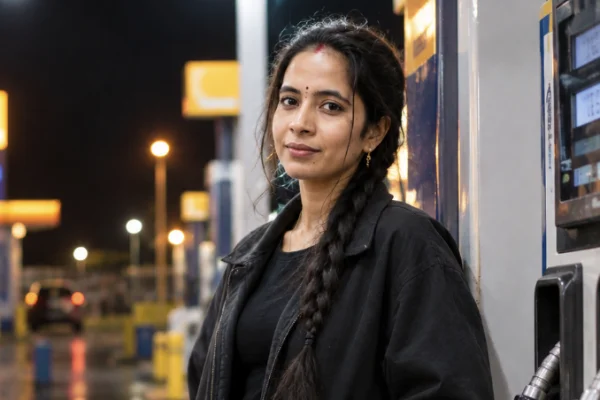
One prompt, one photo, no background image to download. That's the whole thing.
Most versions of this trend hand you five prompts and a background file to merge yourself into. This page does the opposite — a single night petrol pump AI photo prompt that builds the entire scene from one selfie, plus the two lines you can swap to change the look completely.
But before the prompt, one thing worth understanding, because it's the reason so many of these come out unflattering.
The Problem With Overhead Light
A petrol pump canopy is lit by panel lights pointing straight down. That's what gives these photos their distinctive look — but straight-down light is also the least flattering angle there is. It lands on the forehead and the top of the cheekbones, then drops shadow directly under the eyes, the nose and the chin.
The result is a face that looks flat, tired, and slightly hollowed out. Great for a moody portrait of a guy leaning on a bike. Less great when you actually want to look good in the photo.
The fix is simple and almost nobody includes it: ask for light bouncing back up from the wet ground.
"Soft warm light bouncing up from the wet tarmac, filling the shadows under the eyes and chin."
Wet tarmac genuinely does this in real life — it acts like a giant reflector. Adding one line asking for it keeps the dramatic overhead look while stopping the face from collapsing into shadow. It's the difference between a photo you post and one you delete.
Two Lines to Swap
You don't need a different prompt for a different look. Change these and everything else holds.
The wardrobe line. Swap for whatever you want — a long coat, a saree with a shawl, a plain kurta. Keep it dark and plain though. Canopy light hits fabric hard from above, so busy prints come out warped and white blows out completely.
The pose line. Three that work as well as the default:
Leaning back against the dispenser, arms loosely crossed, looking down the road to her left.
Walking past the dispenser mid-step, jacket moving with the motion, not looking at the camera.
Standing at the edge of the forecourt with her back mostly to the camera, looking out at the dark road, part of her profile visible.
That last one is worth trying if your source photo isn't great — less face in frame means less drift.
If It Doesn't Come Out Right
The face looks flat or shadowed. The bounce-light line is missing or too weak. Strengthen it: strong warm bounce from the wet ground clearly filling the shadows on the face.
The ground looks dry and dull. Add oil stains and puddles. Dry tarmac kills both the reflections and the bounce light.
The signage is gibberish. Ask for generic unbranded signage, or no readable text at all. Real fuel brand names come out warped every time — that's the first thing that makes an image look fake.
Your face got smoothed. State it both ways: do not smooth the skin and preserve visible skin pores and natural texture.
It looks like a game render. Remove any stacked superlatives like "8K hyperrealistic cinematic". One realism instruction does more than five.
FAQ
Do I need to download a background image? No. This prompt builds the full scene from your photo alone.
Which tool works better? Gemini holds facial likeness better, ChatGPT handles the lighting description better. Try both with the same prompt.
Does the free version work? Yes, with daily generation limits.
Why does my face change? Almost always a filtered or blurry source photo. Use a clear, unfiltered, front-facing one.
Can I use my own outfit? Yes — replace the wardrobe line with keep the clothing exactly as in the reference image.
Conclusion
One prompt is enough once the lighting logic is right. Keep the canopy light overhead, let the wet ground bounce it back onto the face, and swap the wardrobe and pose lines when you want something different.
Generate it twice before you settle. The second attempt is almost always the better one.