Article
• August 25, 2026
• 121 reads
Mahadev AI Photo Prompt 2026 – Free Cinematic Shiva Portraits
"The Mahadev AI photo trend has held steady well into 2026, and it shows no signs of slowing — devotees turning an ordinary selfie into a cinematic, temple-poster-style portrait: vibhuti on the forehead, a rudraksha mala, a glowing Kailash backdrop, or a rain-soaked scene beside a stone Shiva idol. This guide covers what actually makes these prompts convincing, along with several ready-to-use versions across the most popular styles. "
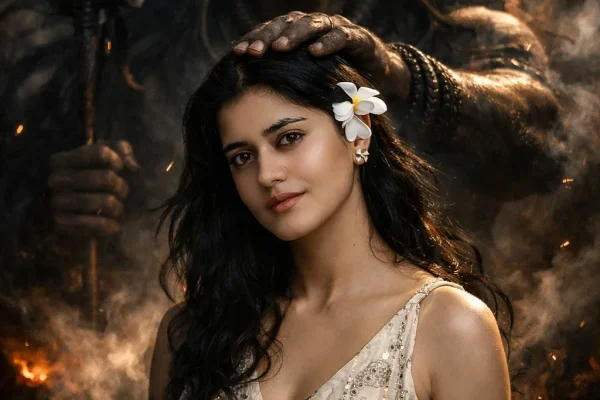
Unlike a lot of AI photo trends that peak and fade within weeks, Mahadev-themed edits have stayed consistently popular because the underlying devotion isn't tied to a single viral moment — it's an ongoing, genuine practice for millions of people. Combine that with AI tools getting noticeably better at photorealistic rendering and accurate facial preservation over the past year, and the results now look convincingly cinematic rather than obviously artificial, which keeps the trend fresh even after a full year of widespread use.
Copy-Paste Ready Prompts
Getting a More Realistic, Respectful Result
Always include "preserve exact facial features and skin tone" — without this instruction, results tend to drift from your actual likeness.
Add "no exaggerated glow effects, natural lighting" if a result looks overly fantastical rather than grounded and cinematic.
Specify "realistic tilak, no oversaturated color" to avoid an artificial-looking forehead marking.
Keep the overall framing respectful and devotional rather than overly dramatic — the most convincing results in this trend tend to look calm and reverent rather than theatrical.
How to Use These Prompts
Choose a clear, well-lit, front-facing photo of yourself.
Open Gemini or ChatGPT and upload that photo.
Paste your chosen prompt, adjusting outfit or setting details as preferred.
Generate the image, and regenerate 2-4 times if the likeness or details don't come out quite right — this is normal.
Compare a few versions and pick the one where your face looks most accurate and the mood feels genuinely reverent.
Common Mistakes to Avoid
Skipping the identity-preservation instruction. This is the most common reason results end up looking like a different person entirely.
Using a blurry or angled reference photo, which limits how accurately the AI can preserve your likeness.
Overloading one prompt with too many settings at once — combining a river scene, a temple courtyard, and a split-tone effect together tends to confuse the output.
Accepting an overly theatrical first result. Adding "natural lighting, no exaggerated glow" usually pulls the image back toward something more genuinely respectful.
Conclusion
The Mahadev AI photo trend has stayed popular because it taps into genuine, ongoing devotion rather than a passing moment — and the results have only gotten more convincing as the tools improve. Use a clear reference photo, keep the identity-preservation instruction in every prompt, and aim for calm, natural lighting over exaggerated effects for a portrait that feels genuinely reverent rather than artificial.
Copy Paste This Prompt
1. Devotional Embrace With the Shiva Idol
"Using the uploaded photo as the strict facial reference, create a hyper-realistic, cinematic 8K portrait of the same person, dressed in a simple deep-toned kurta, gently embracing a large stone bust of Lord Shiva. A natural red tilak is visible on the forehead. The setting is an open temple courtyard with weathered stone pillars, soft monsoon rain falling, water streaking across the stone idol's surface. Lighting is soft, diffused daylight through rain clouds. Preserve exact facial features, skin tone, and expression from the reference photo — calm, reverent mood, no exaggeration or glow effects."
Copy Paste This Prompt
2. River Devotion at Dawn
"Using the uploaded photo as the exact identity reference, generate a realistic, cinematic portrait of the same person standing waist-deep in a calm river at early sunrise, hands folded in prayer, eyes gently closed. Soft golden morning light reflecting off the water. In the distant background, a softly blurred Himalayan mountain silhouette suggesting Kailash. Preserve the person's exact facial features and skin tone from the reference photo. Serene, respectful, photorealistic, no exaggerated glow or fantasy elements."
Copy Paste This Prompt
3. Temple Courtyard Namaste Portrait
"Using the uploaded photo as the strict facial reference, create a realistic devotional portrait of the person standing with hands folded in namaste before a large Shiva idol inside a traditional temple, rudraksha mala visible around the neck, soft incense smoke drifting through warm golden lighting. Rangoli patterns faintly visible on the temple floor. Preserve exact facial features and natural expression. Respectful, photorealistic, cinematic depth of field, no artificial glow effects."
Copy Paste This Prompt
4. Split-Tone Cinematic With Shiva Sketch
"Using the uploaded photo as the strict identity reference, generate a cinematic split-tone portrait: on one side, the person standing on a hilltop at dusk in warm golden light wearing a simple loose linen shirt, calm expression, hand relaxed at their side; on the other side, a subtle monochrome line-art illustration of Lord Shiva holding a trishul, blending softly into the sunset clouds. Preserve exact facial features and skin tone. Moody, artistic, respectful devotional tone, photorealistic on the human subject."